Kudos bot for Slack
A Slack kudos bot for fast, visible recognition
Make the good work happening in Slack easier to notice. Karl gives every teammate a low-friction way to send a thoughtful shoutout, reinforce a value, and keep appreciation moving.
30-day free trial · No credit card required · Install in under 2 minutes
How to give kudos in Slack with Karl
- Install and choose a channel. Add Karl to your Slack workspace, review the permissions, and invite Karl to the channel where your team will share recognition. Ask your Slack admin if app approval is required.
- Write the command and choose a person. Type
/kudos, select a real teammate from Slack’s mention picker, and describe the contribution and its impact. - Review before sending. Karl opens a confirmation with your message. Choose an appropriate company value and an optional GIF; select None if you do not want a GIF.
- Submit and check the channel. Submit the confirmation to share the kudos. The recipient is included in the monthly recognition count; the message gives the team the context behind it.
/kudos @Sam for documenting the release checklist. The support team could pick up the launch without another meeting.
This is example text. Replace @Sam with a Slack mention and describe work you observed. For more wording, use our 24 Slack kudos message examples.
If your first kudos does not work
- The command is unavailable: check that you are in the workspace where Karl was installed and that the app installation was approved.
- You see help instead of a confirmation: include a teammate mention and the reason after
/kudos. Select the person in Slack rather than pasting a plain-text name. - You are in a direct message: move to your recognition channel. Karl’s kudos command is intended for channel recognition and rejects direct-message use.
- A company value is missing: review the values configured in the Karl dashboard. The available choices come from your workspace’s values.
Review Karl’s Slack permissions before installation, or contact support if setup is still blocked.
From “nice work” to a recognition habit
The best kudos are timely and specific. Karl keeps that moment close to the conversation, so a teammate can recognize the result without opening a separate employee engagement platform.
Use Karl for project launches, customer saves, helpful reviews, mentoring, incident response, or the quiet work that keeps a team moving. The message is simple; the consistency is what compounds.
Example kudos
“Kudos to @Sam for turning the customer feedback into a clear launch checklist. That made the handoff much easier for everyone.”
Specific contribution · Clear impact · Visible in the team channel
Built for Slack, not bolted on
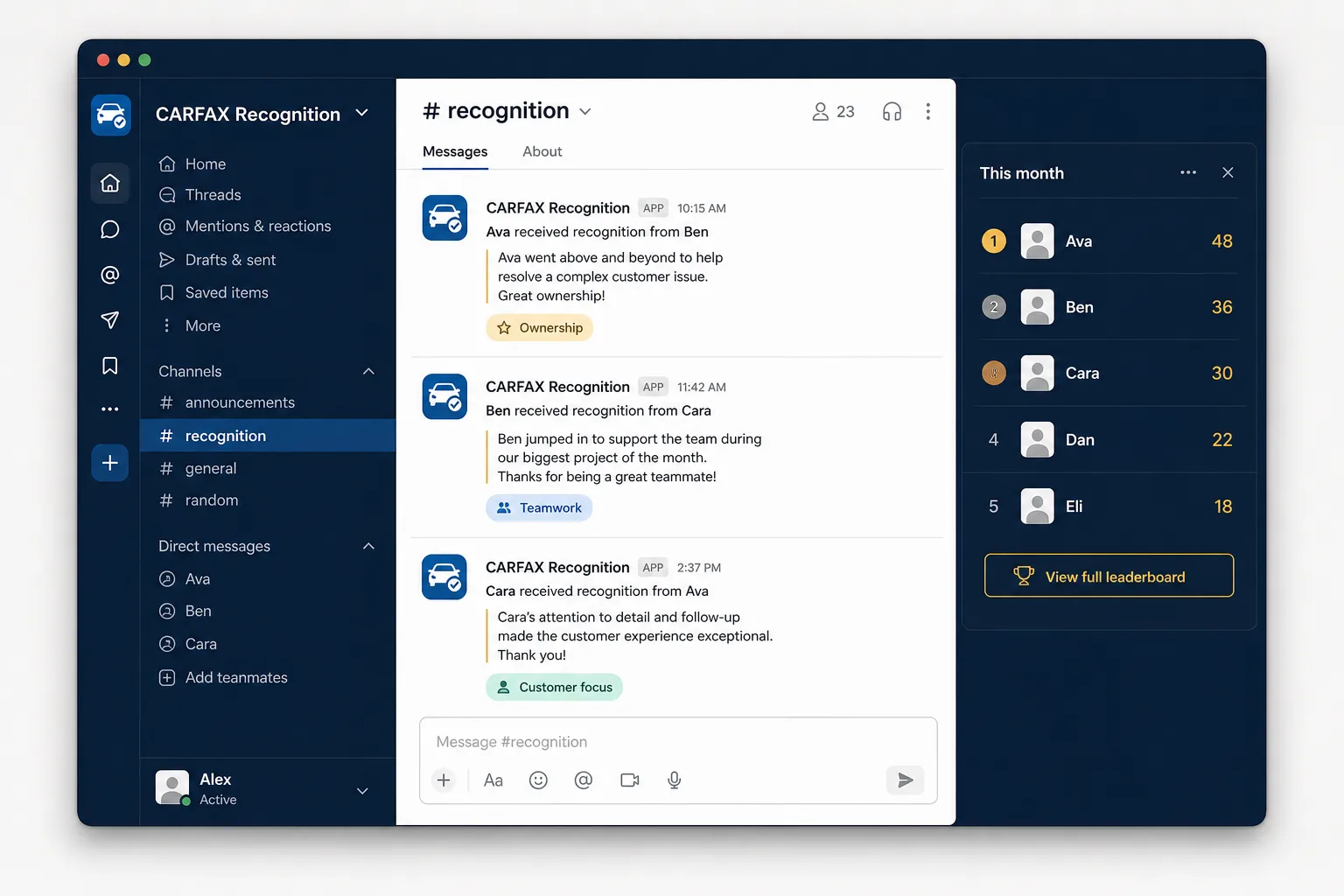
The context stays attached to every kudos.
Teammates can see the contribution, add reactions, and connect the moment to a value without opening another recognition portal. Admins can review the same activity as a trend instead of losing the story behind the number.
Review Karl pricing or compare Karl with other Slack recognition apps.
Everything a useful kudos workflow needs
Peer-to-peer shoutouts
Give teammates a quick way to celebrate each other in the channels where work is already visible.
GIFs and reactions
Add the energy of a Slack-native celebration without making recognition feel formal or slow.
Company values
Tag the value behind a contribution so your culture is reinforced with real examples.
Monthly momentum
Use leaderboards to create a regular recognition rhythm without turning every moment into a competition.
Trends for admins
Review analytics to understand which teams and values are getting recognized over time.
Flexible rollout
Start with a pilot channel, then expand after your team has found a rhythm that feels natural.
A simple rollout plan
01
Set the example
Leaders and managers send the first specific kudos and explain what good looks like.
02
Create a ritual
Add five minutes to a weekly stand-up or close a launch with a recognition round.
03
Learn and adjust
Review participation and ask the team what would make recognition more inclusive.
Still evaluating options? Our best Slack apps guide explains how to compare Slack-native tools by workflow, adoption, and measurement.
Frequently asked questions
What does a Slack kudos bot do?+
A Slack kudos bot makes peer recognition easy to send and easy to see. Karl helps your team share specific shoutouts in Slack, add optional value tags or GIFs, and review recognition activity over time.
Is Karl a replacement for bonuses or rewards?+
No. Karl is designed for timely, everyday appreciation. It can complement a broader rewards program by making the behaviors behind great work visible between formal rewards cycles.
Does the team need a new dashboard?+
The core workflow happens in Slack. Karl also provides analytics and leaderboards for teams and admins who want a clearer view of participation and recognition trends.
Make recognition part of the workday.
Start with the Slack workflow your team already uses, then measure the habits that grow from it.